
A SaaS sales meeting is easier to steer when you prepare before the call. Sales meeting preparation software can support a consistent routine, but the essential work is deciding what you need to learn, what you’ll present and who will lead each part.
It’s easy to focus on the pitch and leave prospect research, meeting objectives or key metrics until the last minute. Prepare these elements in order instead. Review the prospect’s business and priorities, set a buyer-focused agenda, choose the figures that matter and assign meeting roles. For a SaaS conversation, shape your preparation around exploring the buyer’s needs, discussing relevant outcomes and agreeing clear next steps.
Key Takeaways
- Review a prospect’s website, company updates and stakeholder information to shape a relevant conversation.
- Set a clear meeting outcome, build a buyer-focused agenda and share useful materials before the call.
- Choose metrics that help the team discuss pipeline progress, then assign clear roles for presenting and follow-up.
- Match preparation tools to the work you need to do, from organising meeting plans to practising and reviewing sales conversations.
1. Reviewing a prospect’s website and sales pitch
Start with the prospect’s website. Note its products, target customers, positioning and language. Check the contact page for decision-makers and their job titles. For example, a SaaS product page may show which teams use the platform and the problems it aims to solve. Use these details to shape relevant questions, not assumptions.
Next, review recent company updates and stakeholder activity. News, press releases and LinkedIn posts can reveal current priorities, product changes or challenges. A stakeholder’s career history and recent posts may highlight relevant experience and topics they engage with. Use a shared professional interest as a natural opener, then move promptly to the buyer’s business needs.
Read the proposal alongside the prospect’s stated requirements. Mark each requirement and identify where the proposal addresses it. Prepare a concise explanation for each option and note your preferred option. Practise explaining the proposal without relying on the document. This keeps the discussion focused on the prospect’s needs and the value they want to achieve.
For a pipeline review, prioritise three to five opportunities instead of scanning every deal. For each, identify the next decision, main obstacle and action owner. Flag deals that have remained in the same stage for more than two weeks. In forecast calls, connect these details to expected revenue and explain the evidence behind the forecast, rather than relying on activity alone.
Which tools integrate with Salesforce, HubSpot, Microsoft Teams and Outlook? Integrations vary, so compare each tool’s documented connections with the records and meeting workflows your team needs.
For UK use, assess how each tool handles personal data under GDPR and your organisation’s data-protection obligations. Review access, sharing, retention and deletion settings before adding prospect notes or meeting transcripts.
Keep the review practical: record each prospect’s likely priority, one open question and the next step. This gives the meeting a clear starting point and makes pipeline discussions more useful.
2. Setting meeting agendas and objectives
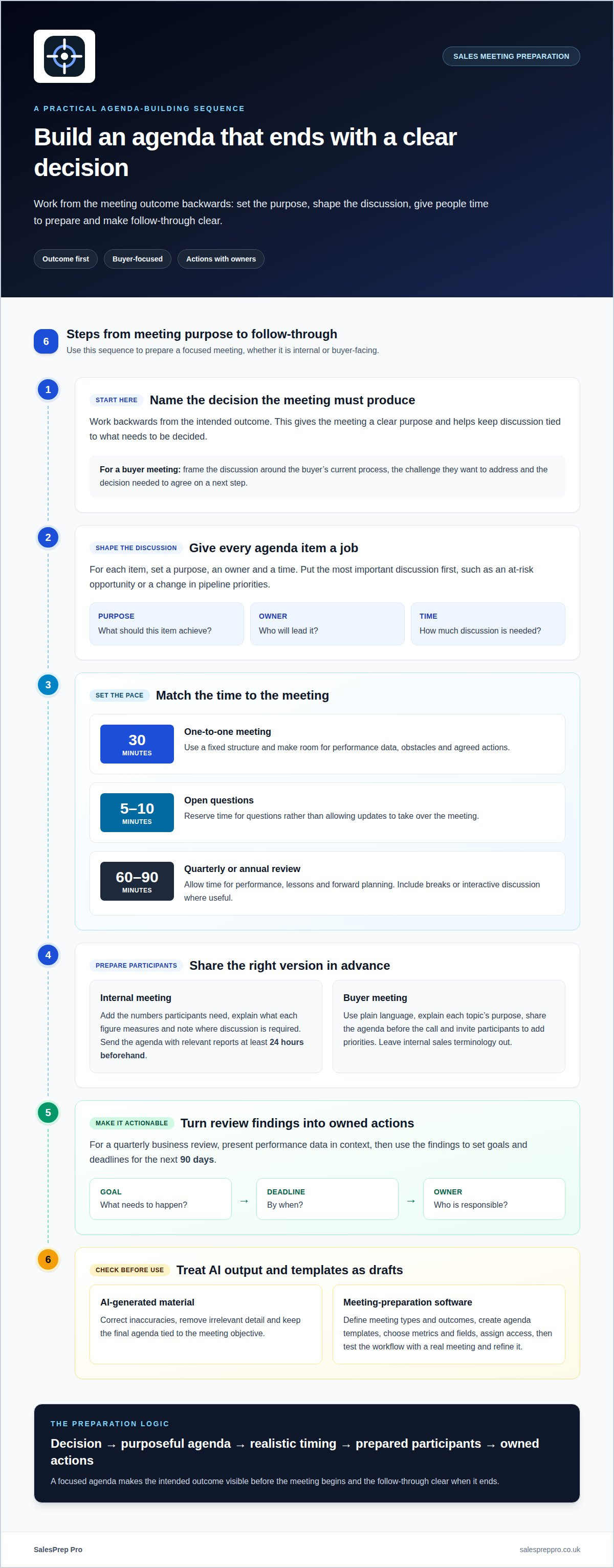
Start with the decision the meeting needs to produce. Work backwards from that outcome, then give each agenda item a purpose, owner and time. For a one-to-one meeting, a fixed 30-minute structure can keep discussion focused. Set time aside for performance data, obstacles and agreed actions, rather than letting updates take over.
Build the agenda around the sales team’s decisions. Put the most important discussion first, such as an at-risk opportunity or a change in pipeline priorities. Add the numbers participants need, explain what each figure measures and note where discussion is required. Reserve five to 10 minutes for open questions. Send the agenda with relevant reports at least 24 hours beforehand, giving everyone time to prepare.
For a buyer meeting, use plain language and explain the purpose of each topic. Share the agenda before the call, state the intended outcome and invite participants to add priorities. For example, a SaaS discussion could cover the buyer’s current process, the challenge they want to address and the decision needed to agree on a next step. Leave internal sales terminology out of the buyer-facing version.
A quarterly or annual review needs a wider view. Allow 60 to 90 minutes for performance, lessons and forward planning, with breaks or interactive discussion where useful. Present the performance data in context, then turn the findings into a QBR action plan with goals and deadlines for the next 90 days. Give each action an owner, so follow-through is clear after the meeting.
AI can help draft agendas, account briefs and call notes from information entered into a tool. Treat its output as a working draft: correct inaccuracies, remove irrelevant detail and keep the final agenda tied to the meeting objective.
To set up meeting preparation software, first define the meeting types and desired outcomes. Then create agenda templates, choose the metrics and fields to capture, assign access and test the workflow with a real meeting. Refine the template if participants cannot find the information they need.
For a more consistent preparation routine, explore sales meeting preparation.
3. Preparing metrics and assigning meeting roles
Choose metrics that answer a decision, not just fill a dashboard. For a pipeline review, focus on three to five deals and ask what changed, what blocks progress and what action follows. A 15-minute review can stay centred on those opportunities. Use charts or graphs to show movement clearly, then explain the figures behind each forecast.
For forecasting, connect each opportunity’s stage to evidence from buyer discussions, agreed next steps and expected timing. Flag deals that have stayed in the same pipeline stage for more than two weeks. Separate confirmed customer actions from assumptions, and record how each affects the revenue outlook. This makes forecast discussions more useful than a simple round of updates.
Assign roles before the meeting so everyone knows how to contribute. A facilitator keeps the discussion on the agenda, the opportunity owner explains the deal context, and a note-taker records decisions and actions. For an at-risk deal, managers can use a four-point inspection process to structure questions and agree on the next move. Close each discussion with an owner and a specific action.
Free trials and plans vary between software products, including their access and usage limits. Treat trial availability as a product-specific term, not a standard feature of sales preparation tools.
AI can organise information, but it may produce inaccurate summaries or miss context in a call note. Check generated details against the source conversation, especially buyer requirements and commitments. Don’t rely on an AI-generated forecast without reviewing the underlying opportunity evidence. Keep sensitive information within the controls your organisation has approved.
Use meeting time for decisions that need people in the room. Send routine updates in advance, then reserve discussion for risks, coaching and critical choices. If a metric has no clear owner or next action, remove it from the meeting view or assign responsibility before the next review.
4. What are the best sales meeting preparation tools for UK businesses?
The right tool depends on the preparation gap. A shared agenda document can organise topics and actions, while a dashboard can display pipeline figures. A dedicated preparation platform can support meeting planning, practice and review. Start with the task your sales team needs to complete, then assess whether a tool handles it clearly.
For a weekly pipeline discussion, use a dashboard or spreadsheet to display opportunity stage, next action and forecast notes. Focus on three to five deals, and make each figure serve a decision. For a buyer meeting, a reusable agenda template can help the organiser state the purpose, order the discussion and capture follow-up actions.
For SaaS sales conversations, connect account preparation to the prospect’s needs and the meeting plan. A brief can bring relevant company context, questions and proposal points together. Rehearsal tools can help a representative practise explaining a product or responding to objections. Transcript review can reveal where a call followed the plan and where the message lost clarity.
Check the workflow before adopting a tool. Can team members find the latest agenda? Can the meeting owner record decisions and assign actions? Can the team review calls or practise key conversations? Confirm how the tool handles integrations, access permissions and prospect information, especially when teams use shared documents and meeting platforms.
Keep the setup proportionate. A small team may need only a consistent agenda and a place to record actions. A team managing complex opportunities may benefit from structured account briefs, practice and conversation review. Avoid dashboards or templates that create extra updates without improving discussions or decisions.
For a structured way to prepare for sales meetings, build your meeting preparation routine.
Shared agenda documents focus on topics and actions, dashboards on pipeline figures, and dedicated platforms can combine planning, practice and review. Ease of use depends on whether the team can find current materials, record decisions and actions, and manage access and integrations without unnecessary steps.
SalesPrep Pro: Prepare for sales meetings
SalesPrep Pro supports sales meeting preparation when prospect research, meeting objectives and conversation practice need a consistent approach. Use it to prepare for sales meetings and calls, focusing on the buyer’s priorities and the outcome you want from the discussion.
Transcript review helps you examine how a sales conversation unfolded and identify messaging to refine. Team coaching supports shared practice, helping team members build confidence and prepare for challenging questions together. These services complement the practical work of setting an agenda, choosing relevant metrics and assigning clear meeting roles.
Turn to SalesPrep Pro when preparation feels inconsistent across your team or sales conversations need focused review and coaching. Contact SalesPrep Pro to discuss preparing for your next sales meeting.
Make preparation part of the way your team works
Choose a preparation routine your team can use consistently, not a process detached from day-to-day selling. The right sales meeting preparation software should support how your team plans and learns while leaving room for judgement in live conversations. Identify where preparation breaks down, then decide which habits to strengthen.
SalesPrep Pro brings together sales meeting preparation and transcript review. Use these tools to improve meeting readiness and reflect on real sales conversations. The aim is practical: make preparation useful before the next discussion, and use each review to inform the next one.
If you’re ready to build a more deliberate approach to sales meetings, contact SalesPrep Pro today. Take the next step at a pace that suits your team, and keep improving through focused preparation and review.
Frequently Asked Questions
What is sales meeting preparation software and what features does it include?
Sales meeting preparation software helps salespeople organise and improve their preparation for buyer conversations. Depending on the platform, it can support meeting planning, role play, transcript review and team coaching. SalesPrep Pro combines preparation for sales meetings and calls with interactive practice and transcript review. Choose features that match your team’s preparation tasks, rather than adding tools no one uses.
How do sales meeting preparation platforms compare on features and ease of use?
Shared agenda documents organise topics and actions, dashboards display pipeline figures, and dedicated platforms can support planning, practice and review. Compare how easily the team can find the latest agenda, record decisions and assign actions. Choose a setup that fits the work without creating unnecessary updates.
What security, GDPR and data protection requirements apply to these tools in the UK?
For UK use, assess how a tool handles personal data under GDPR and your organisation’s data-protection obligations. Review access, sharing, retention and deletion settings, and keep sensitive information within the controls your organisation has approved.